Sweepy: Home Cleaning Schedule
- 4.5
- Rating
- 1.00M
- Installs
- Free
- Price

 Analysis by App-foxy
I started using Sweepy: Home Cleaning Schedule because I wanted something more practical than a handwritten list and less complicated than a full project-management system. Cleaning is easy to postpone when every task feels equally urgent, so I was interested in an app that could turn the vague idea of “I should tidy up” into a routine I could actually follow. After spending time with it, I found a focused home-maintenance tool that works best when you treat it as a shared planning aid rather than a magical solution to household mess.
The app comes from Appsent and sits in the House & Home category. It is free to start, rated for Everyone, and has built a sizeable audience with over a million installs and an average rating of 4.5 from around eighteen thousand ratings. Those figures suggest that the basic idea is easy for many people to understand: divide the home into manageable areas, record what needs attention, and use the schedule to keep chores from disappearing from view.
My overall impression is positive, but I would not recommend installing it without thinking about how you actually clean. Sweepy is most useful for people who need structure, families trying to share responsibility, and anyone who feels that routine chores become stressful mainly because they are difficult to track. It is less suitable if you only want a simple alarm, a printable checklist, or a completely manual system with no setup period.
You May Also Like

 Blood Strike: 2.5 Anniversary
Blood Strike’s Loadouts Turn Every Drop Into a Tactical Gamble
A close look at Blood Strike’s custom loadouts: how fast access to signature weapons reshapes its battle royale rhythm, rewards preparation, and narrows the gap between fights.

 Pandora - Music & Podcasts
Pandora’s Music Is Easy to Start, but Harder to Recover
Pandora’s strength is its low-effort path from a seed to a station. Its weak spot is how much confidence it asks you to place in connection, setup, and quiet recovery.

 8 Ball Pool
 Is Built on Rivalries, Rematches, and Routine
A close look at the rivalries, rematches, shared routines, and unanswered safety questions that turn a quick pool match into a persistent mobile community.

 Samsung Music
’s Quiet Strength Is Playing What You Already Own
Its reach comes less from spectacle than from dependable access to a personal library. That simplicity is both the app’s strongest retention engine and its ceiling.

 AccuWeather: Weather Radar
AccuWeather Review: A Quick, Clear Forecast for Everyday Decisions
For everyday plans, the best forecast is the one you can understand quickly. AccuWeather makes rain timing, radar, and local conditions easy to act on, with a few trade-offs.

 Hill Climb Racing
Why Hill Climb Racing Still Turns Crashes Into One More Run
A tiny car, a bumpy hill and one more upgrade: Hill Climb Racing keeps resurfacing because its simple chaos makes every near-miss feel personal.
More From Our News Desk
View All News


How the cleaning system feels in everyday use
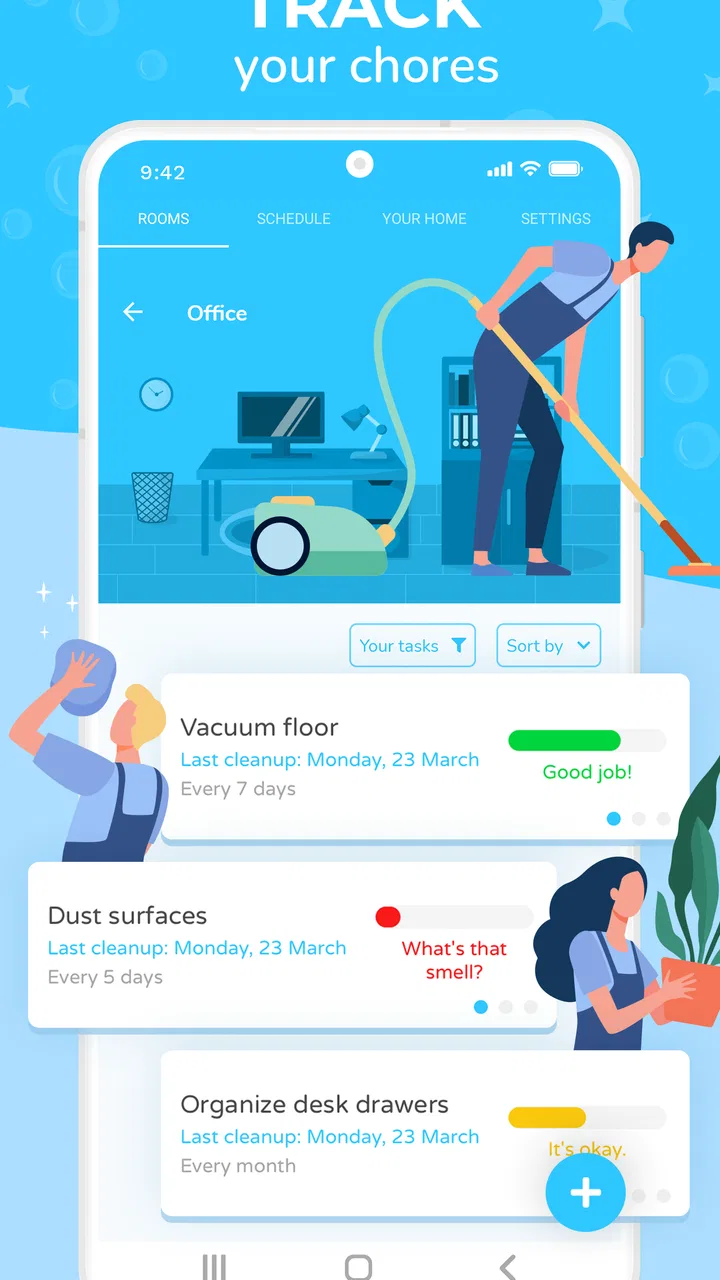
The first useful change is psychological. Instead of looking at the entire home as one enormous job, I can think about individual rooms and the condition of particular areas. That makes it easier to choose a realistic task when I have only a few minutes. A quick reset of one space feels achievable, while “clean the house” is so broad that I might avoid starting altogether.
I found the app more helpful when I used it to plan maintenance rather than punish myself for unfinished work. A home is never permanently clean, so a schedule that treats every missed task as a failure can become irritating. Sweepy works better when I regard its suggestions as a guide. If a busy week interrupts the plan, I can use the next session to restore the most important areas instead of trying to compensate for every missed item at once.
A realistic example is a weekday evening when I have about fifteen minutes before dinner. I can open the app, choose the room that needs the most attention, and select a small task instead of wandering from one unfinished job to another. On a weekend, the same approach can help me divide heavier work across several rooms. The value is not that the app cleans anything for me; it is that it reduces the mental effort involved in deciding where to begin.
That distinction matters when comparing it with ordinary alternatives. A paper list is wonderfully private, flexible, and fast to edit, but it does not naturally help me judge what deserves attention next. A calendar reminder can tell me to clean on Saturday, yet it usually lacks the room-by-room context that makes the reminder actionable. A general task manager may offer more powerful labels and projects, but it can feel excessive for recurring household work. Sweepy occupies the middle ground: more guided than paper, more focused than a calendar, and less broad than a productivity suite.
Why the setup deserves patience
The app becomes more useful as the home is represented accurately. If I add too many tasks immediately, the schedule can feel demanding before I have established a rhythm. I prefer starting with the rooms and chores that cause the most everyday friction, then expanding gradually. This is one of the less obvious lessons of using a cleaning scheduler: accuracy is not the same as completeness. A shorter plan that I follow is better than an impressive plan that I ignore.
I also recommend separating visible daily clutter from occasional deep cleaning. If every small action is placed beside infrequent jobs, the list can become noisy. A useful approach is to keep routine resets distinct from tasks such as cleaning neglected corners or dealing with seasonal storage. That separation makes the next action clearer and prevents a single difficult chore from making the whole schedule look impossible.
Another practical tip is to use the app as a conversation starter in a shared home. Rather than telling someone that they “never help,” I can point to a specific room or task and discuss how often it should be handled. That does not solve disagreements about standards, but it moves the conversation from memory and frustration toward a visible plan. For couples, families, or roommates, that can be more constructive than relying on whoever notices the mess first.
Who gets the most from it
Sweepy is a strong fit for people who repeatedly forget low-urgency chores. These are the jobs that are not disastrous when delayed for a day, but become unpleasant when ignored for weeks. It can also help people moving into a new home, because the act of listing rooms and responsibilities exposes areas that are easy to overlook.
It may be especially useful for someone who struggles with task initiation. The problem is often not a lack of willingness; it is the number of decisions involved. Which room should I choose? What counts as enough for today? What has been ignored longest? A structured cleaning app can reduce that decision load, provided the user is willing to maintain the underlying plan.
I would be more cautious about recommending it to someone who already has a reliable paper routine. If a notebook on the refrigerator is visible, shared, and genuinely used, switching to an app may add a screen without adding much value. It is also not the best choice for a person seeking professional cleaning management, detailed household inventory, or a broad system for bills, repairs, shopping, and family administration. Its strength comes from staying centered on cleaning organization.
Trust, controls, and the moments that deserve attention
Because this is a home app, trust is not only about whether the schedule works. I also want to know what I am choosing when I install it, what controls are visible, and whether the app feels proportionate to the job. Sweepy is free, with optional in-app purchases ranging from $2.49 to $15.99 per item. That means I would pay attention to which parts of the experience are available without payment and whether an upgrade is genuinely useful for my household rather than simply attractive during setup.
The age rating is Everyone, which matches the straightforward nature of its subject. Still, an age label is not a substitute for reading the permission prompts and privacy choices shown on the device. When I install any household app, I check what access it requests, whether a permission is necessary for the feature I want, and whether I can decline it without losing the basic function. I would apply the same careful habit here instead of assuming that a cleaning schedule needs broad access to my phone.
Data-sensitive moments can appear during account creation, synchronization, notifications, or optional sharing features. My advice is simple: pause at each screen that asks for information, read the wording, and avoid adding personal details that are not needed for the routine. A cleaning schedule can reveal patterns about when a household is occupied, so I would keep entries practical and avoid treating the app as a diary of private routines.
I also prefer to decide deliberately whether a shared household needs individual accounts or a common device. The right choice depends on who uses the plan and how much separation is wanted. Before inviting anyone else into a household workflow, I would check what they can view or change, whether an account can be removed, and how paid access is handled. Visible user choice matters more than convenience at the moment of installation.
These are not reasons to distrust the app; they are sensible checks for any service that organizes information about a home. The developer is Appsent, and the current version is 6.1.3. The app supports devices running Android 7.0 or later, so compatibility is worth checking before planning a household around it, especially if an older phone is being used as a shared control point.
What I would change in my own routine
I would avoid opening the app only when the house already feels out of control. That turns it into an emergency checklist, which is not where a schedule is strongest. Instead, I would use it briefly after a cleaning session to update the condition of each area, then return when I need a small next step. This keeps the app connected to real conditions rather than forcing me to reconstruct several weeks of missed work.
I would also resist setting every task to an ideal frequency at the beginning. People often design routines for their most organized week, not their normal week. A more sustainable plan reflects work, school, children, health, and unexpected interruptions. Once the basic rhythm feels comfortable, I can make adjustments. That gradual approach is a concrete advantage over a static checklist, because the schedule can evolve with the household instead of becoming a reminder of an unrealistic standard.
For shared use, I would agree on what “done” means before assigning responsibilities. One person may consider a kitchen reset complete after wiping surfaces, while another expects the sink, floor, and appliances to be handled too. No app can settle that difference automatically. Sweepy can make the task visible, but the household still needs a clear agreement about the expected result. This is an important limitation if you hope software alone will remove domestic negotiation.
I would also use room selection strategically. When energy is low, I would choose the space that affects the next few hours, such as the kitchen before cooking or the entryway before guests arrive. When energy is higher, I would tackle a less visible task that has been postponed. This turns the schedule into a decision aid rather than a rigid command list, and it helps keep motivation connected to an immediate benefit.
Where the experience can become frustrating
The main friction is that the app still depends on honest maintenance. If I do not mark tasks, adjust the plan, or revisit the rooms, the schedule stops representing reality. That is not unique to Sweepy, but it is easy to forget when an app presents an orderly system. The cleaner the setup looks, the more tempting it can be to assume that organization has already happened.
There is also a risk of over-structuring a flexible activity. Some people clean according to energy, visitors, weather, or whatever is most visible that day. A schedule may feel restrictive if it constantly tells them that another task is due. In that situation, a lightweight notes app or a paper list may be calmer. I would not use Sweepy as a measure of personal success; I would use it as a way to reduce forgotten work.
Another trade-off involves paid features. The free starting point makes it easy to test the basic workflow, but users should decide whether optional purchases solve a real need. If the household is small and the routine is simple, paying may not be necessary. If the app becomes a central shared system, the value of additional options may be easier to judge. I would wait until the free experience has been used consistently before spending money.
The app also cannot replace specialized tools. Someone managing repairs, appliance warranties, recurring bills, or a detailed inventory will likely need another system. Likewise, users who want automatic smart-home control, professional service booking, or extensive collaboration should compare it with broader household platforms. Sweepy is narrower, and that narrowness is both its appeal and its boundary.
My cautious verdict
I recommend Sweepy to anyone who wants a clearer way to divide home cleaning into manageable actions and is prepared to spend a little time shaping the schedule around real life. Its best quality is not a flashy feature; it is the way a large, emotionally tiring job can become a series of visible decisions. For a busy household, that can make the difference between reacting to mess and maintaining a workable routine.
I would install it first as a trial, keep the initial plan small, and pay close attention to the permissions, account choices, notifications, and purchase screens presented on my device. I would also decide in advance what information belongs in the schedule and what should stay private. That approach lets me evaluate both usefulness and trust without giving the app more control over my household habits than it needs.
For a free House & Home app with a mature user base, Sweepy offers a sensible answer to a very ordinary problem: remembering what needs doing before it becomes overwhelming. It is not a replacement for judgment, cooperation, or a cleaning service, and it will not suit people who dislike scheduled routines. But if you want a practical middle option between a paper list and an overbuilt productivity system, I think it is worth trying. The strongest results come when I use it as a flexible guide, not as a strict scorecard for how well I keep my home.
FAQs for Sweepy: Home Cleaning Schedule
01What is Sweepy: Home Cleaning Schedule, and how does it work?
Sweepy: Home Cleaning Schedule is a mobile app designed to help you organize and manage your household cleaning tasks. It allows you to create a personalized cleaning schedule, assign tasks to different days, and track your progress. The app provides reminders and notifications to keep you on track, ensuring that your home stays clean and organized without overwhelming you.
02Is Sweepy suitable for families and shared living spaces?
Yes, Sweepy is perfect for families and shared living spaces. The app allows multiple users to be added to the same household, making it easy to delegate tasks and share responsibilities. Each member can see their assigned duties and mark them as completed, promoting teamwork and ensuring that everyone contributes to maintaining a clean home.
03Does Sweepy offer any customization options for cleaning tasks?
Absolutely! Sweepy provides a flexible platform where you can tailor tasks to suit your specific needs. You can create custom tasks, set their frequency, and prioritize them according to urgency. This customization ensures that your cleaning schedule aligns perfectly with your lifestyle and the unique requirements of your home.
04Are there any in-app purchases or subscription fees associated with Sweepy?
Sweepy offers a free version with basic features, but to access premium functionalities, such as advanced task management and additional customization options, a subscription may be required. The app offers various subscription plans to fit different budgets, allowing you to choose the one that best meets your needs.
05Can Sweepy integrate with other smart home devices or applications?
Currently, Sweepy does not offer direct integration with smart home devices. However, its user-friendly interface and scheduling capabilities complement smart home setups by helping you efficiently manage household chores. Keep an eye on future updates, as the developers may introduce integration features to enhance the app's functionality.
Pros
- Intuitive interface simplifies task management.
- Customizable cleaning schedules for flexibility.
- Syncs across devices for family collaboration.
- Reminders help keep users on track.
- Visual progress tracking boosts motivation.
Cons
- Limited features in the free version.
- No integration with smart home devices.
- Occasional syncing issues reported.
- Lacks multilingual support.
- No offline access to schedules.

Sweepy: Home Cleaning Schedule
Gallery